Wednesday, November 25, 2015
Padlet Unit Plan
The topic of racism and stereotyping have been in the news recently, both in the United States and internationally. I thought it was important to create a unit plan that reflected both current events, but also our country's troubled history on the subject. I think our history can serve to teach us the way forward on many topics, and hopefully on this one too.
My Padlet
I created the essential questions and unit goals for this lesson based on several different things: one was a lesson plan I found that focused on the topic, the other was recent news stories and incidents that provoked questions in my own mind about how we are handling stereotyping as a country, and the other was the historical perspective through which I've been viewing our country as I zero in on Social Studies as a topic.
I chose the apps and websites I did because it will give students the chance to not only express themselves, via YouTube and Google Docs, but also the opportunity to learn more about this topic, and others, if they so choose (the Smithsonian Channel's website). I also wanted to include a more multidisciplinary approach to the topic, which is why in my further reading section I include a psychology website, and the book "To Kill a Mockingbird."
Hope you all enjoy.

Saturday, November 7, 2015
Share Ideas and Opinions: Google Docs
Google Docs

Google Docs About Page
Google Docs is a productivity suite offered free to Google users and something that has become increasingly common as a tool for students throughout k-12. Google Docs offers the user tools for creating documents, Excel-style sheets, or slides in a Power-Point-like format. What makes it so user friendly is that it comes loaded with dozens of templates that the user can use to create professional-looking reports or presentations.
Google Docs works perfectly in service of the share ideas and opinions learning strategy because it gives students an easy-to-use method for communicating their thoughts and ideas on a given subject; in my case, on Social Studies topics that I might want to teach them.
A good example is the Slides feature. Within the slides feature is a great template for doing book reports, which is a great way for students to express how they are interpreting a shared reading project. The template has a title page, an "About" page, a main characters page, and more, already ready for the student. By taking the formatting work out of the students hands, Google Docs allows them to focus on their own thoughts and feelings about historical works and figures. i would have my students read a short book about the American Revolution and then have them use the Slides feature to report on the main themes and figures from the revolution.
The only drawback to Google Docs is that it might make it too easy for a student to cut and paste information into the slides without much thought as to what is most important about what they are studying.

Google Docs About Page
Google Docs is a productivity suite offered free to Google users and something that has become increasingly common as a tool for students throughout k-12. Google Docs offers the user tools for creating documents, Excel-style sheets, or slides in a Power-Point-like format. What makes it so user friendly is that it comes loaded with dozens of templates that the user can use to create professional-looking reports or presentations.
Google Docs works perfectly in service of the share ideas and opinions learning strategy because it gives students an easy-to-use method for communicating their thoughts and ideas on a given subject; in my case, on Social Studies topics that I might want to teach them.
A good example is the Slides feature. Within the slides feature is a great template for doing book reports, which is a great way for students to express how they are interpreting a shared reading project. The template has a title page, an "About" page, a main characters page, and more, already ready for the student. By taking the formatting work out of the students hands, Google Docs allows them to focus on their own thoughts and feelings about historical works and figures. i would have my students read a short book about the American Revolution and then have them use the Slides feature to report on the main themes and figures from the revolution.
The only drawback to Google Docs is that it might make it too easy for a student to cut and paste information into the slides without much thought as to what is most important about what they are studying.

Monday, November 2, 2015
Supporting Instruction With Technology
I chose this particularly lesson plan because it explores key topics in American history: stereotyping and multiculturalism. It's important as educators that we openly discuss the racial and cultural histories we share.
From this lesson plan I learned that having students create their own original content, you can facilitate their learning far more than if you simply present them with someone else's original content. The idea of having students create a YouTube video (or DVD in this lesson plan) requires the student to gather source material but also to interpret it. Too often, students simply cut and paste source material into their papers and never delve deeply into their own thoughts on the subject. The video, teamed with the poem "Where I'm From," is a nice tool for getting students to think critically.
I believe this lesson plan aligned its curriculum goals, teaching strategies and technologies beautifully. It was clearly written a while ago, but have student immediately write their reactions to class material in ClassPress, then having them follow that up with their own video and poetic interpretations of the material is perfect synergy. At every step of the lesson plan, the teacher is developing students' abilities to interpret stereotypes and discover their patterns, while also relating these stereotypes and patterns to their own personal experiences.
I think I could use Google Sheets for limited applications in my classroom; for example: I could have the students create graphic organizers for the material we read together in class, focusing on the key players and events in the events we study.
Friday, October 16, 2015
Analyzing Visual Images and Stereotyping: The Smithsonian Channel App
The Smithsonian Channel App

Smithsonian Channel App
The Smithsonian Channel App is an app designed to bring Smithsonian channel content to the mobile user. It has both full length episodes of its shows and documentaries, and snippets of some of the most popular shows on the channel. Users can also test their historical knowledge by taking a history quiz which provides photos accompanied by multiple choice questions. There is also channel information about upcoming shows and There is also a feature which allows you to enter your personal historical interests and then provides five clips from shows that might interest you.
The app is free and is available at the Apple apps store.
Sample graphics:

Smithsonian Channel App
The Smithsonian Channel App is an app designed to bring Smithsonian channel content to the mobile user. It has both full length episodes of its shows and documentaries, and snippets of some of the most popular shows on the channel. Users can also test their historical knowledge by taking a history quiz which provides photos accompanied by multiple choice questions. There is also channel information about upcoming shows and There is also a feature which allows you to enter your personal historical interests and then provides five clips from shows that might interest you.
The app is free and is available at the Apple apps store.
My subject is Social Studies, and while I enjoy learning about historical events, I understand that for some people, history can be dry and lack engagement. For younger kids, who are used to interactive games and tablets, this is especially true. The Smithsonian Channel App is interactive and visual. It gives the user the control to cater their viewing to reenactments and documentaries that they are studying. As a Social Studies teacher, it would be my job to teach my students how to analyze the visual historical images they see when studying a particular event. As an example, the images of the holocaust that many students are shown need context and explanation. By using this app, I could provide my students with instant access to short, pertinent content about WWII and how the concentration camps came to be.
The only major problem I can foresee when using this app is that the interactive component may not be enough to keep the interest of older students. A more game-heavy application, designed to teach history, might be better.
Sample graphics:
Sunday, October 11, 2015
History of Technology in Social Studies
This short PowToon is about television's impact on teaching Social Studies. Specifically, how it gave teachers a way to actually show historical events, live, to their students, rather than having to use still photos or old film reels.
History of Technology in Social Studies PowToon
History of Technology in Social Studies PowToon
Saturday, October 3, 2015
Compare and Contrast Ideas: The Opposites
The Opposites

The Opposites
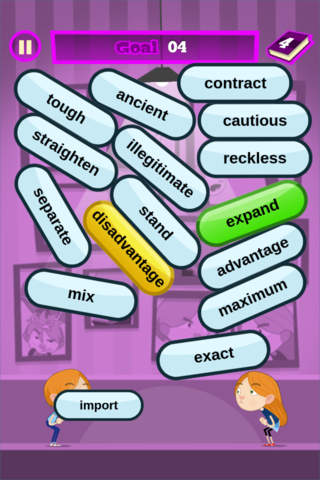
The Opposites is a reading comprehension app which focuses on vocabulary through game play. The game is very simple and easy to follow and is based around a brother and sister "arguing" with words: they each say a word, which floats to the top of the screen, and as the words fill the room, the player must tap on a word and its opposite to make it disappear. The player must delete enough words to keep the room from filling up.
The Opposites costs $.99
Pros
The app supports teaching through comparing and contrasting by teaching how words relate to one another. I have a student with reading disabilities and one of his weaknesses is vocabulary, specifically how words interplay in the context of a passage. I have been looking for a way to help him learn new words in a fun way and this app is perfect. Whatever word he doesn't know during the game, he can look up in the dictionary function of the app (see below how this feature could be better).
Cons
This app is available on most popular devices and is engaging enough for most students. The only problem I see with the app is that the dictionary feature is not available during game play. If there is a word my student doesn't know, he has to exit out of the level to go to the dictionary to learn it.
Here is a screenshot of the game:


The Opposites
The Opposites is a reading comprehension app which focuses on vocabulary through game play. The game is very simple and easy to follow and is based around a brother and sister "arguing" with words: they each say a word, which floats to the top of the screen, and as the words fill the room, the player must tap on a word and its opposite to make it disappear. The player must delete enough words to keep the room from filling up.
The Opposites costs $.99
Pros
The app supports teaching through comparing and contrasting by teaching how words relate to one another. I have a student with reading disabilities and one of his weaknesses is vocabulary, specifically how words interplay in the context of a passage. I have been looking for a way to help him learn new words in a fun way and this app is perfect. Whatever word he doesn't know during the game, he can look up in the dictionary function of the app (see below how this feature could be better).
Cons
This app is available on most popular devices and is engaging enough for most students. The only problem I see with the app is that the dictionary feature is not available during game play. If there is a word my student doesn't know, he has to exit out of the level to go to the dictionary to learn it.
Here is a screenshot of the game:
Friday, September 25, 2015
Reflection on Influential Technologies
The children in "Learning to Change, Changing to Learn: Student Voices" have grown up with technological devices--and the learning styles those devices facilitate--that I have only recently adopted as an adult with children of my own. I grew up without television, cellphones or GPS devices, but each these things has impacted how I learn about my world, for better and for worse.
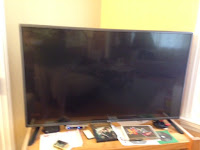 My current television
Before the age of twelve, I had very little exposure to television. When I was a young man, my family lived overseas as part of my father's work for the State Department. We had few channels, if any, and I spent most of my days outside, riding my bicycle and playing with friends. I developed a real passion for foreign cultures and when we returned to the United States, I found that I could continue to experience those cultures through the many travel channels available from our cable network.
I also used television to learn about American culture because I had so many questions about American music, sports, and slang. What did it mean when some told me something and then said, "psych"? I had to use television to learn, just as the children in "Student Voices" have probably done since birth. The only problem was that I watched too much television and began to miss out on what was happening in the real world. Now, with my smartphone, I can be out in the real world and still be ignoring it, just like everyone else!
 My current television
Before the age of twelve, I had very little exposure to television. When I was a young man, my family lived overseas as part of my father's work for the State Department. We had few channels, if any, and I spent most of my days outside, riding my bicycle and playing with friends. I developed a real passion for foreign cultures and when we returned to the United States, I found that I could continue to experience those cultures through the many travel channels available from our cable network.
I also used television to learn about American culture because I had so many questions about American music, sports, and slang. What did it mean when some told me something and then said, "psych"? I had to use television to learn, just as the children in "Student Voices" have probably done since birth. The only problem was that I watched too much television and began to miss out on what was happening in the real world. Now, with my smartphone, I can be out in the real world and still be ignoring it, just like everyone else!

The other day, I wondered to myself if Lamar Hunt, the former owner of the Kansas City Chiefs was still alive (he is not) and where his father, L.B. Hunt, had made his fortune. With my smartphone I had the information in seconds; as a child, finding the information would have involved a trip to the library with my parents, or a search of our encyclopedias. That kind of paper search is foreign to the kids in "Student Voices."
The first boy to talk in the video stated that "writing and reading have been taken over by technology," and he's right. It's still a foreign concept to me to read a book on an electronic device. I still prefer paper, but the kids in the video are so accustomed to reading on a screen that they will probably prefer it for life.
The students in "Student Voices" have developed communication and research skills that are wildly different from the ones I developed as a child. I do wonder if the kids in the video would know how to learn about Mr. Hunt's life without access to their phones. One of the young girls in the video mentioned that she wouldn't mind if her phone was glued to her hand, she felt that attached to it. I have come to use my phone in the same way; it is my entertainment, communications and research device all in one. I have a laptop and a desktop, but I rely on my smartphone ten times as much as I do those devices. In fact, it has come to replace another device on my list: my GPS.
I used to use my GPS to get everywhere. I had to: I seem to have been born without a sense of direction. With my GPS, I could go for drives without really worrying about getting lost. In fact, I would sometimes just drive for an hour or so, then turn on my GPS and find my way home. The kids in the video live in a different world technologically than I did when I got my license. The cars they will learn to drive are almost all going to be equipped with some form of navigation, and if they aren't, these kids will be able to use free GPS apps on their phones, just as I do now. I no longer need a standalone GPS device.

My now abandoned GPS device.

I like learning as the children in "Student Voices" do, but I'll stick to paper books for now.
Subscribe to:
Posts (Atom)